








Watch our recent Live Stream Event. The Cost of Duplicate Cases
Learn more
Case Merge Premium

Stop Wasting Money on Duplicate Cases

Case Merge Premium is a Salesforce-native app that automatically detects and merges duplicate cases.

Trusted by

A lower cost of service

Enable your team to resolve cases instead of searching for duplicates.

Case metrics you can trust

Measure true performance with accurate KPIs that aren't inflated by duplicate cases.

A consistent experience

Give customers reliable, unified answers. No duplicate responses or conflicting information.

The difference between a basic feature...

Salesforce Service Cloud has basic case merge capability, but support teams quickly encounter limitations:
  1. No duplicate detection: reps waste time hunting for duplicates.
  2. Three-case merge limit: multiple rounds of manual merging needed.
  3. Zero auto-merge: every merge requires manual human intervention.

...and a premium solution.

Surface duplicates instantly

So service reps can help customers without worrying about redundant work.

Merge up to 9 cases at once

Handling larger duplicate sets without multiple merge cycles.

Automerge duplicates

Based on criteria you define. High-confidence matches merge without manual intervention.
How does Salesforce's native case merge compare to Case Merge Premium?
The Case Merge Premium Difference

Duplicate cases waste time and make metrics untrustworthy

Customers hate to wait. They email, then call, then try another channel hoping something moves faster.

Sometimes it's impatience. Sometimes it's trying to get a different outcome. Either way, the same issue ends up split across multiple cases.

Agents spend time checking whether someone else is already working it. The work gets duplicated. Case counts inflate. The numbers lie. And once your data is fragmented, performance metrics stop reflecting what's really happening.

Duplicate cases
compound over time

The impact spreads across the organization. SLA reports lose reliability, and it becomes difficult to tell whether the team is actually behind or whether duplicates are inflating the backlog.

Capacity planning suffers when cases get counted multiple times. These issues get worse as channels expand, volume grows, and automation increases. Duplicate cases will happen. Continuously surfacing and merging duplicates prevents fragmented data from turning into larger operational problems.

Duplicate cases,
handled with confidence.

Case Merge Premium has 89 5-star reviews on the Salesforce AppExchange.

Agentforce Service is only as smart as your case data

Agentforce retrieves your CRM data to deliver reliable answers, but when the same issue lives across multiple case records, AI agents pull from conflicting threads, fragmented histories, and incomplete context. Garbage in, garbage out.

Case Merge Premium keeps your data clean: single case records, each focused on one issue. Your AI agents get clear context, which means better outcomes and higher ROI on your Agentforce investment. Clean data in, reliable answers out.

Support from the people who built it.

Case Merge Premium is supported by the same people who are accountable for how it performs in production. Questions are triaged by people who understand how the app works in real Salesforce orgs, not routed through layers of generic support.

It has cleaned up our workflow and made a frustrating part of case management simple. Definitely a big time-saver for our team.
Hans Simon
Business Development and Salesforce Specialist, Otodata
Easy to manage and use, great support team.
Ridvan Ay
Developer, Panopto
Excited to use to have more efficient work environment.
Naveen Gayapaku
Developer, TE
This saves hours of administrative work and highly recommend!
Sean Mueller
Senior Manager Systems and Tools, Charter
Great product and customer support.
Eugene Gervacio
We have been using Case Merge Premium for a few years, it has been working great!
Tina O'Dell
Salesforce Amin, Vita Group
"Highly recommended for any team looking to take their case management to the next level!"
Christina Lingley
Customer Operations, Teamworks
"It's easy to use, setup is seamless and the vendor support is good!"
Patrick Lutiger
Manager, Global CRM, Komax AG

Get started today

Talk with a specialist about the advantages of Case Merge Premium, and see it live in action.

Automatically
merge duplicate cases.

Automerge handles high-confidence duplicates without user intervention. Your support team can focus on resolving cases instead of administrative work. Choose when Automerge runs and how merges are performed.

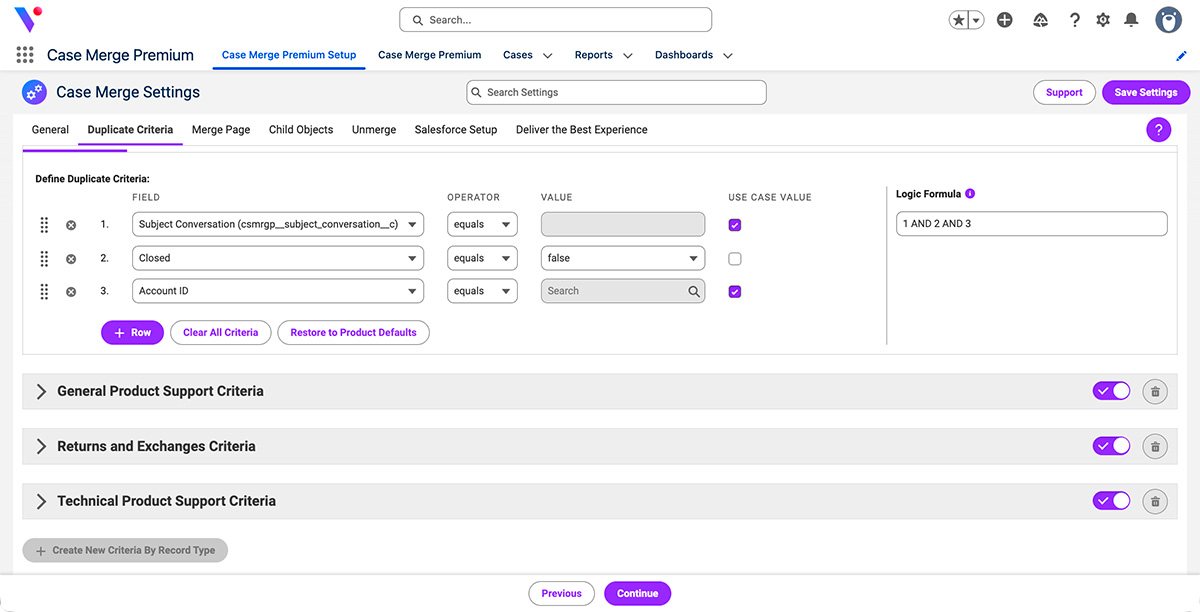
Configure strict and unique duplicate criteria, then let Automerge handle the rest. Track performance to see how many duplicates you're catching and refine your rules over time.

Configure your way.
Monitor with confidence.

Salesforce admins control how Case Merge Premium behaves:
  1. Customize rules for different service teams
  2. Define what's considered a duplicate
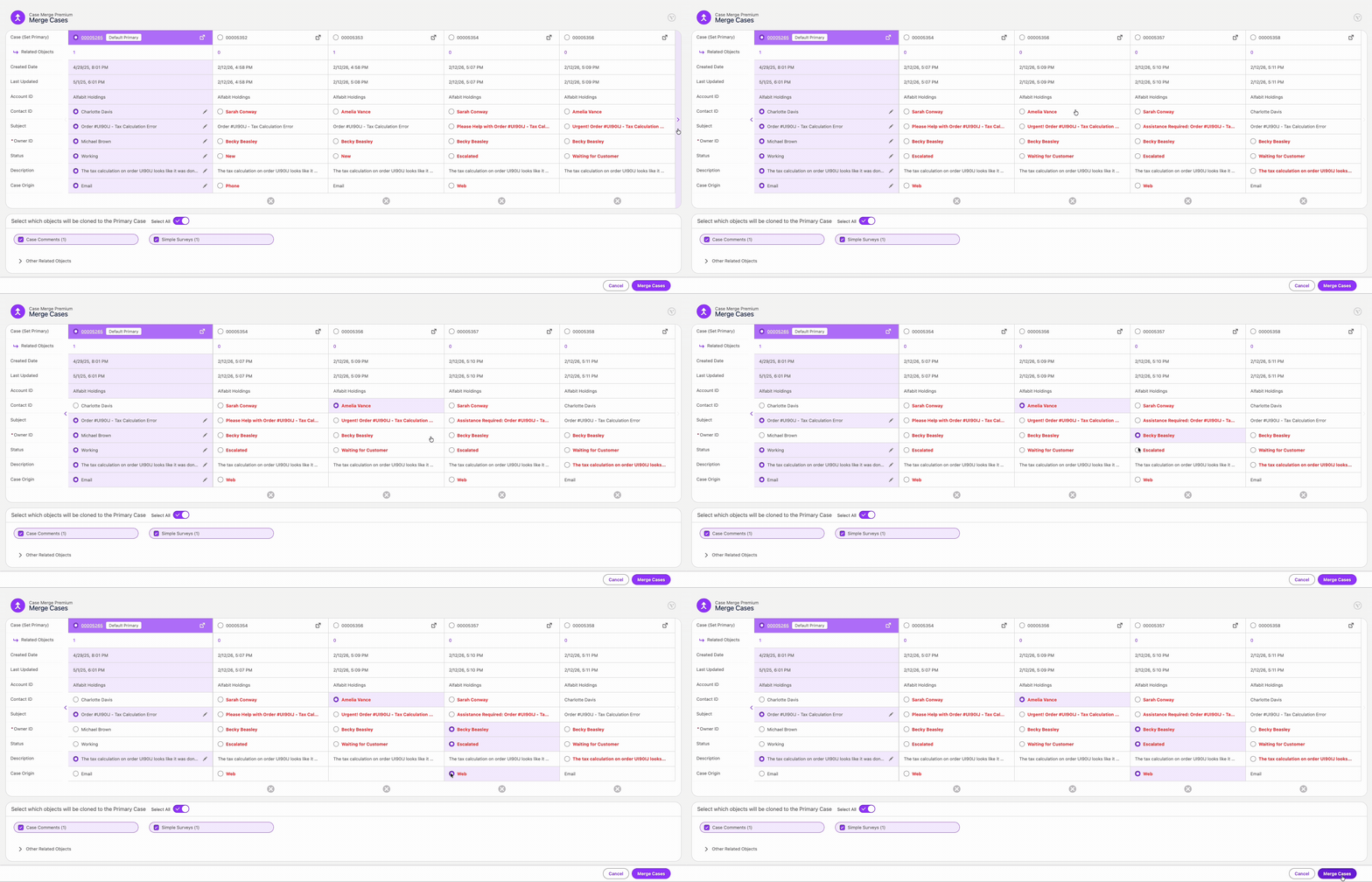
  3. Tailor the merge process: control displayed fields and object treatment
  4. Control how case descriptions combine (append, comment, or Chatter post)
  5. Refine rules over time by tracking which criteria catch duplicates
  6. Undo accidental merges with a single click
A screenshot of the duplicate criteria settings available in Vicasso's Case Merge Premium app for Salesforce.

Duplicate visibility.
Everywhere in your org.

Service reps see a clear indicator on any case with potential duplicates. Managers use the Duplicate Case Utility Bar to see all duplicates across the org, making it easy to triage and resolve at scale. Save time by quickly resolving or dismissing duplicates.
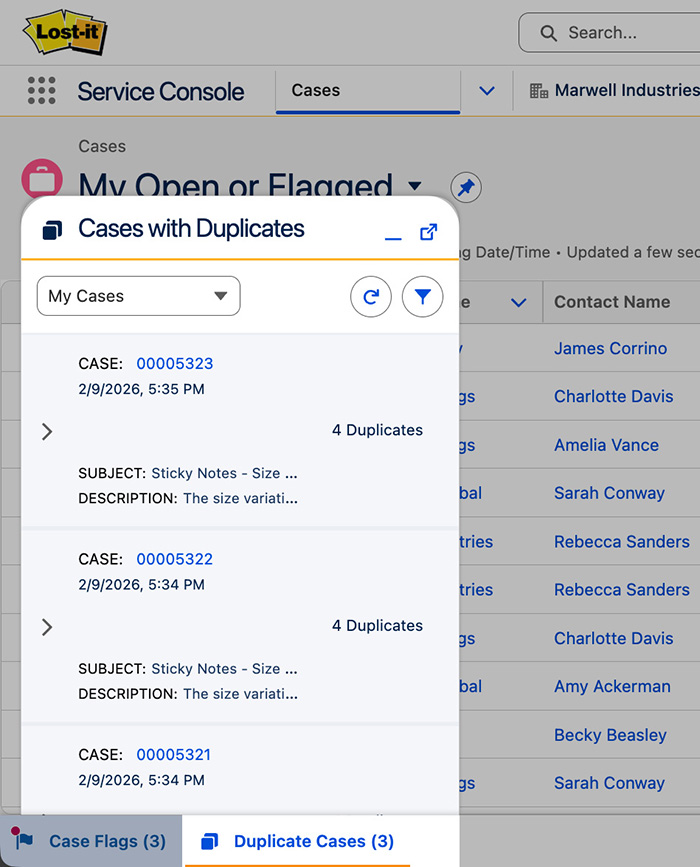
A screenshot of the Utility Bar Component of Vicasso's Case Merge Premium app for Salesforce.

Premium Value

Catch duplicates as they're created

The Duplicate Detector surfaces potential duplicates the moment they enter your org. No manual queue checking required. 

Merge without switching screens

Merge duplicates directly from a case record, account view, or list view. High-confidence matches can merge automatically based on criteria you define.

Never let a case slip through the cracks

Customer replies to duplicate cases are automatically redirected to the active case, keeping all communication in one place.

Your workflows stay yours

Merge data in custom objects related to cases. Your unique business processes stay intact.

Protect the integrity of your case data

Merged cases remain in your system with full history. Duplicate cases link to the primary case for compliance tracking. Unmerge anytime if needed.
Proactive Duplicate Detection
100% Native Salesforce App
Merge Performance Analysis
Zero-Touch Auto Merging
Related Custom Object Control
Complete History Retention
Custom Matching Criteria
Undo Merge
Omni-Channel Support
Utility Bar Component
Packaged Permission Sets
Bulk Case Merging
Cross-Object Matching Criteria
Dashboard & Reports
Advanced Duplicate Discovery
Primary Case Enforcement
Salesforce Platform Security
Auto Response Redirection

Pricing

$12/user/month
$18/user/month with Automerge

$2,160 contract minimum includes 15 users

Volume discounts available
Guided Setup $2,350/org/one-time payment

FAQs

Frequently Asked Questions

How does Case Merge Premium identify duplicate cases in Salesforce?

Case Merge Premium uses a precision matching criteria that goes beyond simple standard rules. Admins can configure logic using standard or custom fields, such as matching Subject lines, Contact IDs, or creation timeframes, to proactively surface duplicates the moment they enter your org.

Can I automate the merging process without service rep intervention?

Yes. The zero-touch Automerge feature allows you to set specific, high-confidence criteria to automatically merge duplicate cases in the background. This solves for "channel thrashing" and ensures service reps work on only one clean case record.

What happens to the data inside the duplicate cases after they are merged?

No data is deleted. The app links the duplicate (child) cases to the primary (parent) case for complete history retention. Users can review merge history and undo merges if needed.

Does Case Merge Premium support custom objects and related records?

Yes, Case Merge Premium offers flexibility in deciding which custom and standard related objects are moved, cloned, or ignored. This ensures that all related lists, custom object records, emails, and attachments associated with the duplicate case are correctly cleaned.

How does the app handle new email replies to cases that have already been merged?

The system features automatic response redirection. If a customer replies to an email thread from a case that was previously merged and closed, the app automatically routes that reply to the active primary case. This ensures no communication falls through the cracks and the conversation history remains unified.

Does Case Merge Premium send any data outside of Salesforce?

No, Case Merge Premium is a 100% Native Salesforce App, and no data ever leaves the Salesforce platform. Your existing platform security is inherited along with compliance standards and business rules. No external systems or integrations are involved.

How many cases can be merged at once?

You can merge up to 9 cases in a single operation, which is triple the standard Salesforce limit of 3. For larger backlogs, the bulk case merging option allows you to process more than 10 cases.

Can merges be undone?

Yes. The Unmerge feature allows you to reverse a merge instantly. This restores the original cases, including their field values and related objects (like emails and attachments), putting everything back exactly as it was before the merge occurred.

Still have questions?