

Case Split

Cases with multiple issues take longer to close.
Give every issue its own case.

Case Split is a Salesforce-native app that separates distinct problems into their own cases.

Trusted by

logo for Legrand
Herman Miller logo.
logo for Johnson Controls.
Imprivata logo
Quest Diagnostics logo.
logo for TransUnion

Close cases faster

Keep handle times short by working on one issue at a time, not switching context between two or three issues on the same ticket.

Case metrics you can trust

Measure performance with accurate KPIs. Multi-issue cases distort the numbers. Reopened cases record new work against the original case's metrics.

Clean case data for Agentforce

AI agents are only as accurate as the data behind them. One issue per case gives today's agents and tomorrow's tools clean signals and context to draw from.

Why multi-issue cases make Salesforce reporting unreliable

Support conversations rarely stay on one topic. A customer reaches out about one issue, and while the rep is engaged, mentions a second. Customers often ask other questions “while I have you.”
Agents work through tangled cases instead of resolving clean ones. Resolution times stretch, backlog piles up, and SLA reporting is less accurate. Over time, those numbers shape hiring decisions. You end up budgeting headcount against work that was really one tangled case, not two clean ones.

Case Split is a purpose-built tool to fight scope creep in case management

Split in seconds

One action. No tab-toggling, no manual adjustments, no second-guessing.

Choose what moves

Move emails, attachments, and related records to the new case. Common workarounds leave them behind.

Keep the audit trail

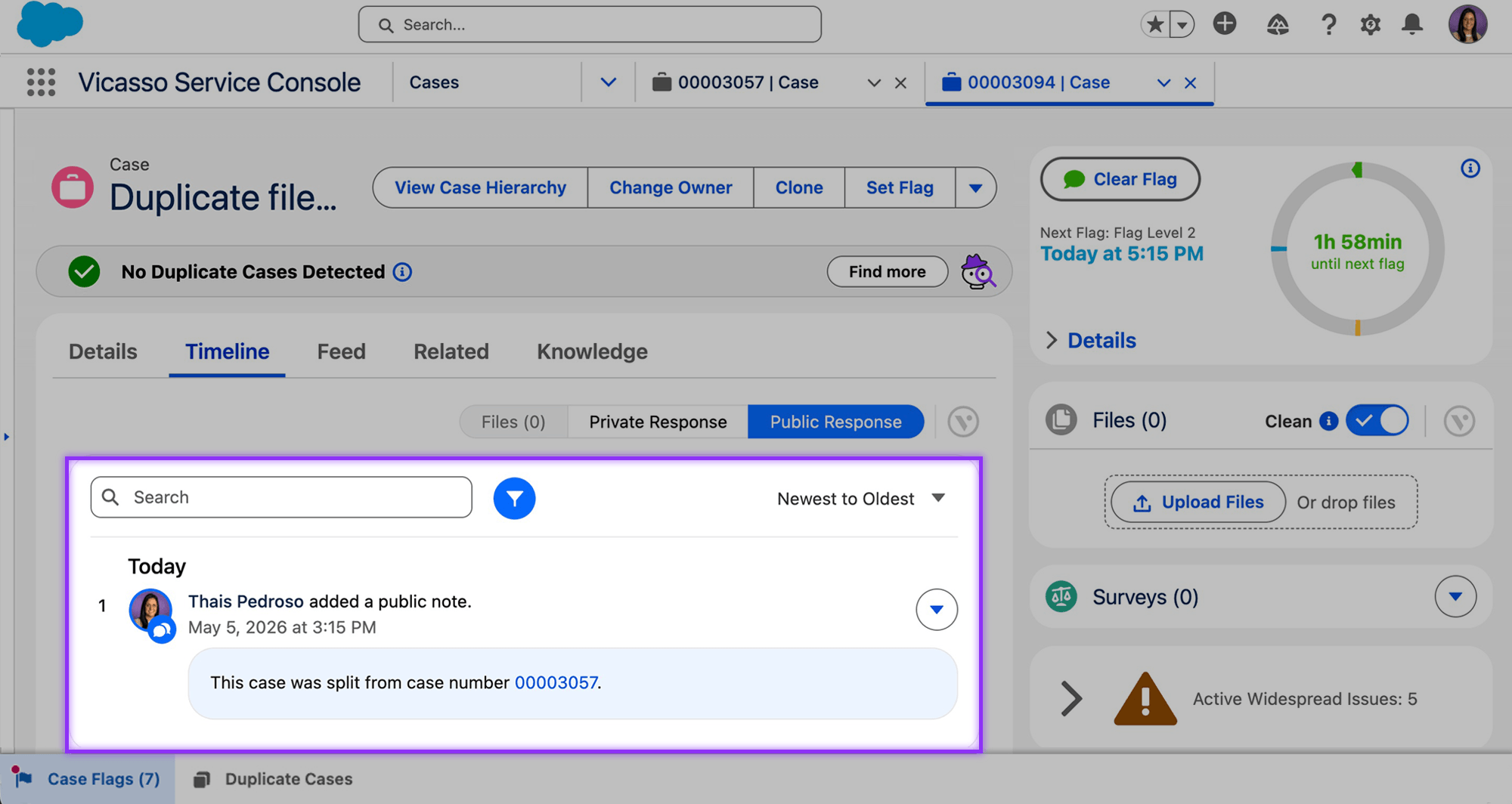
The original and new cases stay linked, preserving history for compliance and reporting.
An animated gif of Vocasso's Case Split app easily splitting a case into a new or existing case.

Move the reply and keep the context.

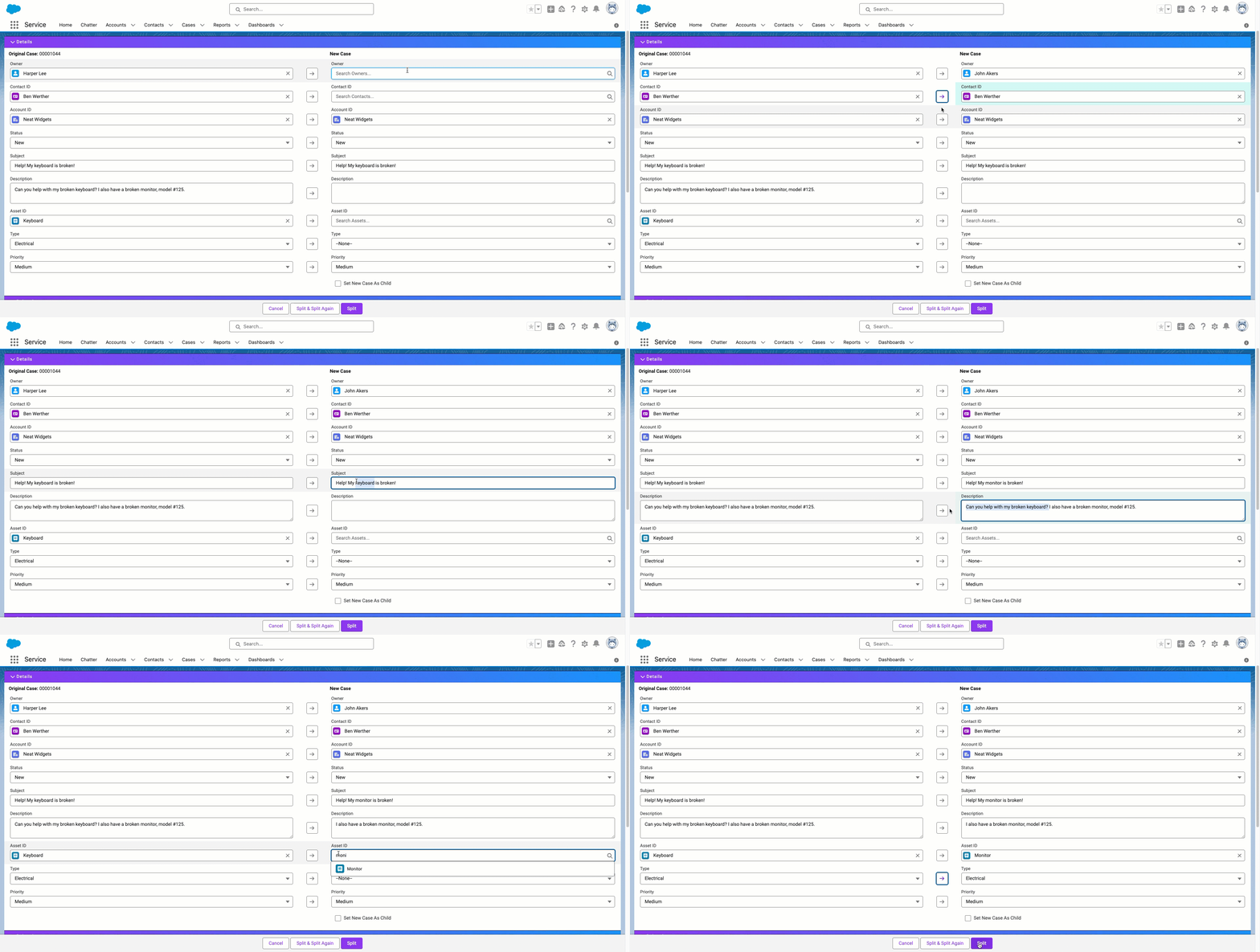
When a new issue is added to an old case, Case Split moves it into its own case, along with the emails, attachments, and comments that belong to it. Both threads end up clean: the original case keeps only the conversation about the original issue, and the new case carries only what belongs to the new one. You can also split into an existing case when the reply belongs on a ticket someone else is already working on.

Watch Case Split in action

Automatically detect and split multi-issue cases

When a new issue is added to an old case, Case Split moves it into its own case, along with the emails, attachments, and comments that belong to it. Both threads end up clean: the original case keeps only the conversation about the original issue, and the new case carries only what belongs to the new one. You can also split into an existing case when the reply belongs on a ticket someone else is already working on.

Know When to Split

Reps don't have to decide whether a case qualifies for a split or remember to check, because Case Split’s AI surfaces it for them. That removes a judgment call from every case and takes the mental load off the team.
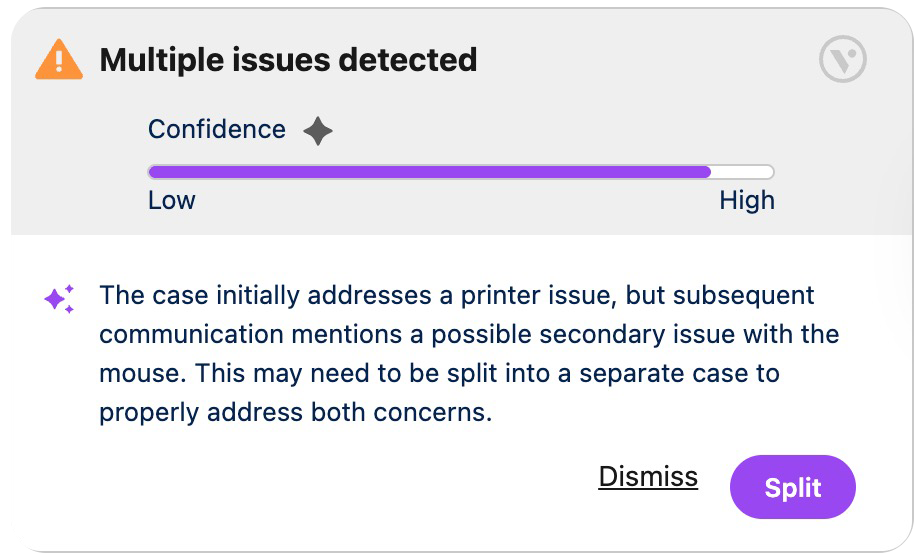
a screenshot of Vicasso's Case Split app for Salesforce showing the page component that alerts the user to multiple issues in a case, and to split the case.

Have AI Split for You

When a case gets flagged, Smart Split handles the mechanics. It identifies the emails, attachments, and comments that belong with the new issue and carries them into a new case, or into an existing one where the issue actually fits. Reps approve the split instead of building it manually.


Screenshot of Vicasso's Case Split app for Salesforce showing how Ai helps automatically bring over the correct files and emails into the new case.
a purple arrow pointing to the right

The result: cleaner cases, accurate metrics, and faster resolution of the issues that actually need attention.
Parallel streams of work

The case object isn't just for support. Teams use cases to coordinate quotes, manage escalations, and run investigations.
Without a way to split, teams have three bad options that don’t scale well:
  1. Run parallel work on a single case, where SLA clock, context, and ownership are tangled.
  2. Pass the case around between teams and losing continuity.
  3. Create child cases that don't carry their own metrics.
Case Split makes multiple streams of work manageable.
  1. Split a vendor coordination case off a customer quote case, keeping both linked.
  2. Split an engineering investigation case from a customer-facing case so a specialist's work runs on its own clock.
  3. Split a billing case off a technical case so the right team owns it.
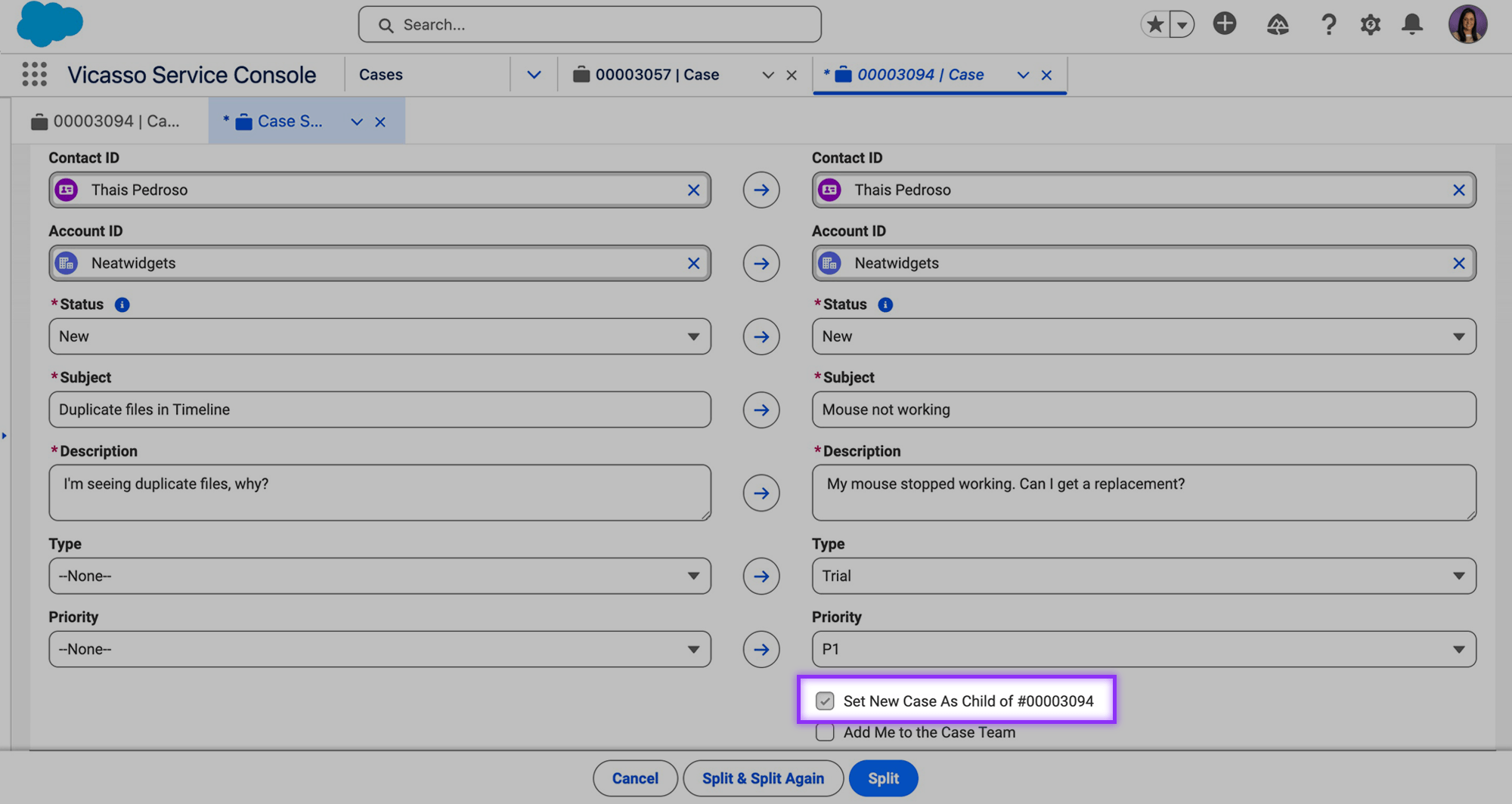
Each case carries its own SLA, history, and owner, linked back to the original so the audit trail holds.

A one-issue-per-case policy reps will stick to

Case Split has a 4.85 average rating on the Salesforce AppExchange.

Get started today.

Talk with a specialist about the advantages of Case Split, and see it live in action.

Easy for admins. Easier for reps.

Salesforce admins control how Case Split behaves. Reps split from the case timeline in one click, so adoption doesn't become your problem.

  1. Move or duplicate data from the original case, with the option to delete originals after splitting.
  2. Choose which case comments, emails, attachments, case team members, or custom objects are copied to the new case.
  3. Each issue gets its own case, so reporting stays accurate and SLA tracking holds up.
  4. The original and new cases stay linked for audit and reporting.

What cloning cases in Salesforce can’t do…

Salesforce lets you clone a case, but support teams quickly encounter limitations:

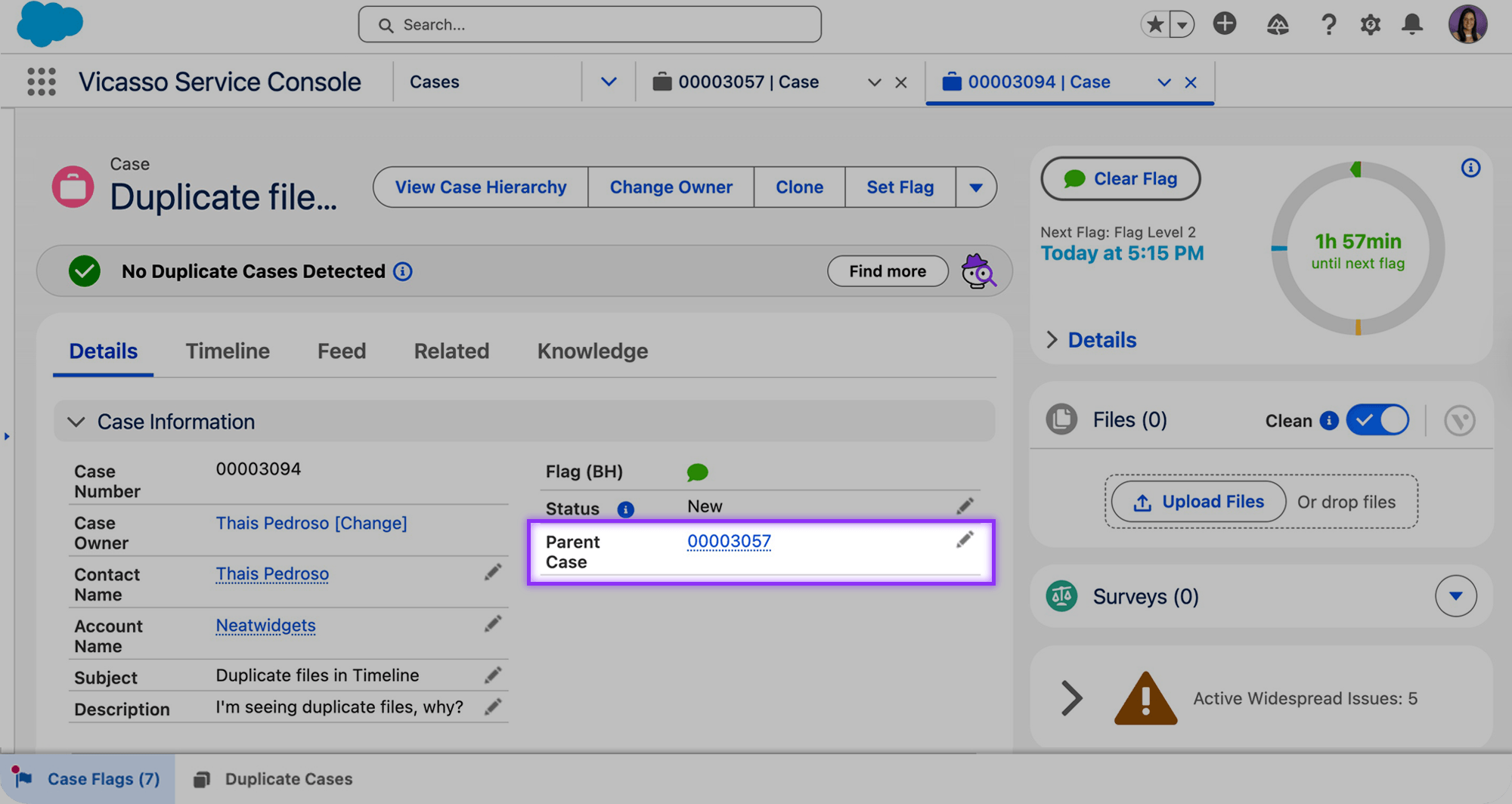
  1. No selective data transfer: cloning copies values from the fields. You can’t bring over specific records to the new case, it has to be done manually afterwards.
  2. Data governance is at the whim of your reps: the original and clone have no parent-child relationship, unless reps manually create one.
  3. Manual cleanup required: when reps bring correspondence from the old case to the new one, they must delete irrelevant messages manually, which takes time and invites errors.

Support from the people who built it.

Case Split is supported by the same people who are accountable for how it performs in production. Questions are triaged by people who understand how the app works in real Salesforce orgs, not routed through layers of generic support.

We opted to use this app which eases customer care to split cases and assign it to different teams instead of manually creating it.
Tharun Killada
Salesforce Administrator/Developer, Regal Rexnord Corp
This app provides functionality that Salesforce was lacking around splitting issues into separate cases.
Justin Lubbert
Director of Support, Panopto
We can split one case into as many cases as needed all from one simple screen. We have seen an immediate time savings return. Highly recommend!
Kein Harrington
Case Split allows us to continue with the case and not have to create a whole new case and populating customer data again.
Tm Byrne
Our business teams often have to separate out emails from one case into a separate case. Case Split makes it easy for them to do so. We've been using it for years.
Peggy McCafferty
"It's easy to use, setup is seamless and the vendor support is good!"
Patrick Lutiger
Manager, Global CRM, Komax AG
We track our case resolution times and this app was a life saver in that regard. I highly recommend both this app - Case Split as well as their sister app - Case Merge Premium!
Swapna Mistry
Brand ID
This product takes the hassle out of creating new cases when your customer lumps multiple issues into one case or responds back to a resolved case with a new issue.
Darin Schwarte
Cirruspath, Inc.

Untangle cases without losing context

Surface multi-issue cases automatically

Know When to Split identifies multiple issues the moment they’re sent. No manual review required.

Split with related records intact

Move emails, attachments, comments, and custom records into the new case with one action. No copy-paste.

Your objects, your rules

Choose which standard and custom objects move with the split. Your data model stays intact.

Protect the integrity of your case data

Original and new cases stay linked for reporting and audit. Each case carries its own history, metrics, and SLA tracking.

Split into new or existing cases

Send the new issue to its owncase, or route it to an open casewhere it belongs.
Split to New Case
Agentforce Agent Extension
100% Native Salesforce App
Split to Existing Case
Smart Split: Automated Record Transfer
Salesforce Platform Security
Selective Record Transfer
Custom Object Support
Packaged Permission Sets
Email Thread Splitting
Case Comment History Preservation
SLA and Entitlement Integrity
Attachment Transfer
Parent-Child Case Linking
Reporting and Analytics
Case Team Member Transfer
Audit Trail Retention

Pricing

$10/user/month

$1,800 contract minimum includes 15 users

Volume discounts available
Guided Setup $1,175/org/one-time payment

FAQs

Frequently Asked Questions

What moves to the new case when I split?

You choose. Case comments, emails, attachments, case team members, and custom objects can all be selected individually. Smart Split carries the records you pick into the new case.

Does Case Split support custom objects?

Yes. You can configure which standard or custom objects are copied to the new case.

Does Case Split send any data outside of Salesforce?

No. Case Split is 100% native to Salesforce. No data leaves the platform.

Can I split into an existing case instead of creating a new one?

Yes. If the new issue belongs on a case someone else is already working, you can split the contentdirectly into that existing case.

What happens to the original case after a split?

The original case stays in place and remains linked to the new case. Both are workable, each with their own comment history and metrics.

Do I need Agentforce to use Case Split's AI features?

Yes. Know When to Split and Smart Split are delivered through Case Split's Agentforce Agent Extension, included free with Case Split. Core splitting works independently—you can split cases, choose what moves, and maintain audit trails without Agentforce enabled.

How does Case Split decide when a case should be split?

Know When to Split flags cases the moment multiple issues appear, surfacing tickets that need to be separated before they tangle your metrics.

How is Case Split priced?

$10/user/month with a $1,800 contract minimum (includes 15 users). Volume discounts are available. Guided Setup is a one-time $1,175/org.

Is there a free trial of Case Split?

Yes. A 14-day free trial of Case Split is available on the Salesforce AppExchange.

Still have questions?